
Domains
A domain represents a custom hostname (or wildcard) you own. Attach it to a project + location, prove ownership with DNS, and the platform terminates TLS and routes traffic for you.
The Domains page#
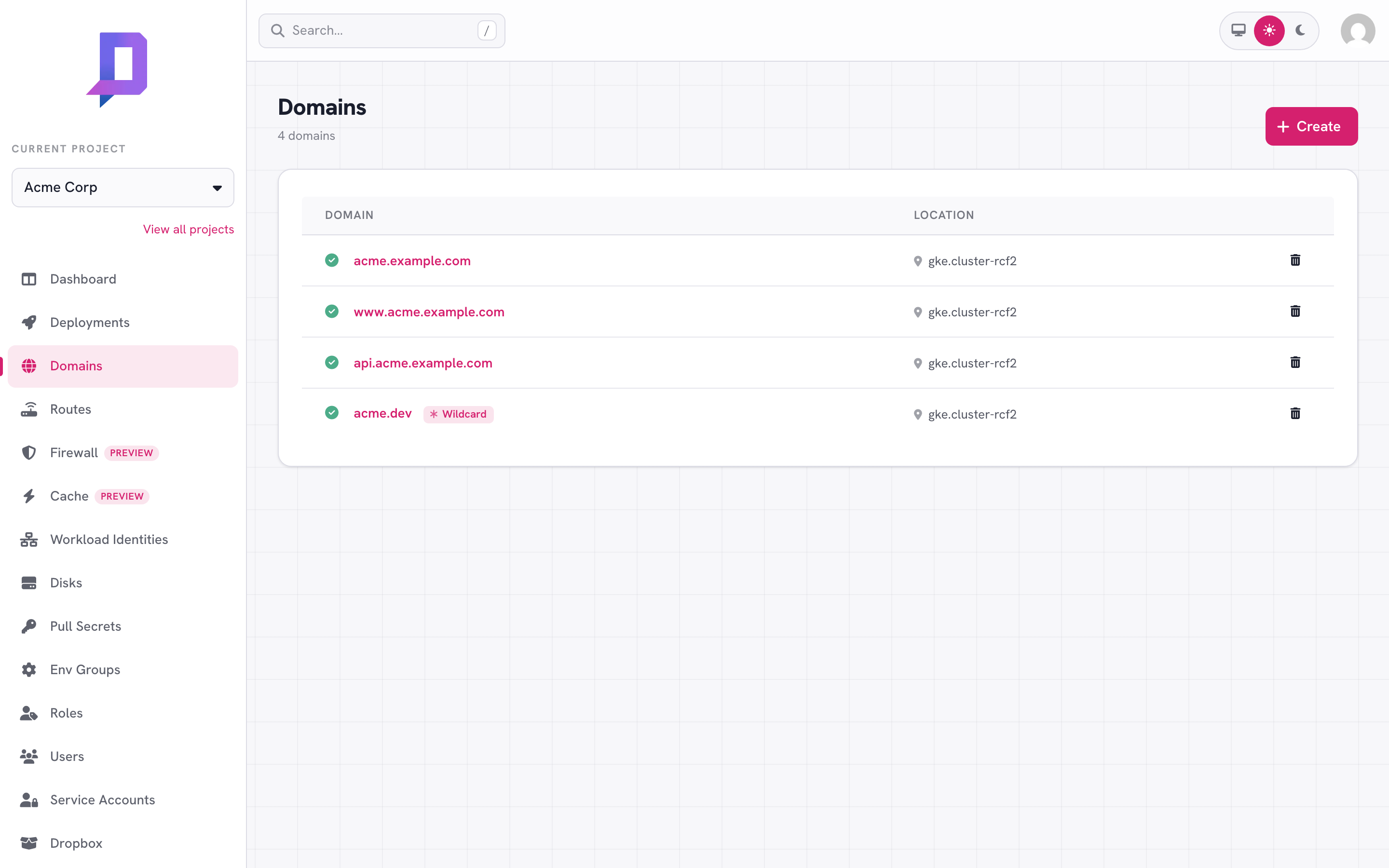
The Domains tab in the console lists every custom domain in the project, with its wildcard flag and the location it’s bound to.
Create a domain#
You’ll set three things:
- Domain — the hostname, e.g.
acme.example.comoracme.dev(apex). - Location — the cluster the domain will serve from. The hostname’s TLS certificate is provisioned in this location.
- Wildcard — if
true, the domain covers*.hostas well ashost.
In locations with edge caching enabled, domains are served through our CDN automatically — there’s no separate toggle. CDN availability depends on the location (see The CDN).
curl https://api.deploys.app/domain.create \
  -H "Authorization: Bearer $DEPLOYS_TOKEN" \
  -d '{
    "project": "acme",
    "location": "gke.cluster-rcf2",
    "domain": "acme.example.com",
    "wildcard": false
  }'
The domain is created in a pending state. To turn it active, you need to verify ownership.
Verify ownership#
After creating the domain, the console shows the DNS records you need to add at your registrar:
- A TXT record at
_deploys.<your-domain>containing the verification string. This proves you own the domain. - A CNAME (or A/AAAA records) pointing your domain at the location’s
ingress. The console shows the exact targets for your location — typically a
*.deploys.appCNAME plus IPv4/IPv6 addresses as a fallback.
Once those records propagate, the platform:
- Reads the TXT record and marks the domain verified.
- Provisions a TLS certificate (Let’s Encrypt) using HTTP-01 or DNS-01 — the console shows the relevant DCV record while it’s in progress.
- Flips the domain to active and starts accepting traffic.
_acme-challenge.<host> CNAME the console shows you. Apex domains usually
verify with HTTP-01 and don’t need that record.When a certificate can’t be issued#
A verified domain normally gets its TLS certificate within a minute or two. Once
in a while issuance keeps failing — Let’s Encrypt is rate-limiting the account, a
CAA record blocks Let’s Encrypt, or (for wildcards) the _acme-challenge CNAME
isn’t in place — and the certificate stays issuing without ever completing.
If a certificate stays unissued for more than 24 hours, the platform reclaims it: the stale request is removed and the domain flips to error. This stops a permanently-failing request from burning Let’s Encrypt quota and surfaces the problem instead of leaving the domain silently without HTTPS.
To recover, fix the underlying cause — clear the CAA restriction, add the
_acme-challenge CNAME the console shows, or wait out a Let’s Encrypt
rate-limit — and the platform re-requests the certificate automatically. The
domain returns to active once the certificate issues.
Routing traffic#
Creating a domain alone doesn’t send any traffic to a deployment — you still
need a route that maps (domain, path) to a deployment.
curl https://api.deploys.app/route.create \
  -d '{ "project": "acme", "location": "gke.cluster-rcf2",
        "domain": "acme.example.com", "path": "/", "deployment": "web" }'
The CDN#
In locations where edge caching is enabled, domains are fronted by our edge cache automatically — it’s included, with nothing to turn on. You get:
- Global PoP routing — TLS terminates at the closest edge to the user.
- Static asset caching with sensible defaults (respects standard
Cache-Control). - DDoS mitigation and request filtering.
domain.purgeCache returns api: location not support
for a domain in such a location.Purge cache invalidates cached content for the domain. It’s available from
the console and as domain.purgeCache in the API. Purge the whole domain, an
exact URL (file), or everything under a path (prefix):
# purge the whole domain
curl https://api.deploys.app/domain.purgeCache \
  -d '{ "project": "acme", "domain": "acme.example.com" }'

# purge a single file
curl https://api.deploys.app/domain.purgeCache \
  -d '{ "project": "acme", "domain": "acme.example.com",
        "file": "https://acme.example.com/style.css" }'

# purge everything under a path prefix
curl https://api.deploys.app/domain.purgeCache \
  -d '{ "project": "acme", "domain": "acme.example.com",
        "prefix": "acme.example.com/assets" }'
file or prefix so
the edge knows which concrete host to invalidate.Removing a domain#
Deleting a domain also deletes any routes that reference it. The TLS certificate is revoked and the platform stops accepting traffic. Existing DNS records will just stop resolving to anything.
curl https://api.deploys.app/domain.delete \
  -H "Authorization: Bearer $DEPLOYS_TOKEN" \
  -d '{ "project": "acme", "location": "gke.cluster-rcf2",
        "domain": "acme.example.com" }'
deploys CLI doesn’t
currently include a domain namespace — use the API or the console.